http://lins.pbworks.com/w/page/97069299/Linux
遲到時間
期中考卷
常見的發行版有...
sessions 界面
文件的來源
=
ubuntu kylin 优麒麟
https://zh.wikipedia.org/wiki/Ubuntu_Kylin
以中國使用者為對象(在linuxx發行版很少有針對地區來開發版本,通常以使用者、語系)
初始版本:2013年4月
得到官方認可
Canonical公司
商業公司,做這個也是商業考量,不是自由軟體的考量
debian上都是公開的,乾淨
ubuntu修改不是公開的
釋出之後才找的到錯誤
=
防火長城
great firewall of china
https://zh.wikipedia.org/wiki/%E9%98%B2%E7%81%AB%E9%95%BF%E5%9F%8E
有好有壞
監控公開
政府審查,非自我審查(但還是會自我審查)
全球一共有13组根域名服务器(Root Server),2010年中国大陆有F、I、J這3个根域DNS镜像,但曾因为多次DNS污染外国网络,威胁互联网安全和自由,北京的I根域服务器被断开与国际互联网的连接。目前已恢复服务。
=
應用軟體
ubuntu軟體中心
2016年5月5日 星期四

2016年4月14日 星期四
2016/04/15
http://lins.pbworks.com/w/page/97069299/Linux
http://lins.pbworks.com/w/file/fetch/106056036/LFS101x.2.pdf
考完試一週聽演講
http://web.lins.fju.edu.tw/chi/node/1918
考試範圍1~6
>介面????
7個預設 session(程序)處理 分時作業(不是同時作業)
介面有另一個英文 interface
一安裝好就有七個session(程序)七部電腦在運作 六個是文字介面 一個是圖形介面
可以分別做不同的事情 一個下載 一個發郵件 之類的...但是電腦跑得動
命令列介面=文字介面,但終端機是圖形介面,只是在終端機的應用程式內是命令列
工作區?
一個session(圖形介面)內有四個工作區
>關機?
方法
>基金會目標?
Linux Foundation Events Linux 基金會活動 Forum, IRC, Worksgroups, 拉攏使用者、系統管理者、核心發展者, 鼓勵合作, 建立和諧氣氛
>kernel的緣起
核心 電腦作業系統內核
核心以前是一個人寫 後來是很多人寫一人統合
光有核心沒有用 還有其他應用程式 cd main list vi
搭配方法最常用是gnu
圖形介面也是一種應用程式 讓使用介面能使用滑鼠
(debian是把xxx放在一起的方法)
核心不使用linux?可以
>操作指令?
>sudo指令 概念
http://note.drx.tw/2008/01/linuxsudo.html
>安裝Linux時需要注意的問題
除了這幾個其實還有其他問題
http://lins.pbworks.com/w/file/fetch/106056036/LFS101x.2.pdf
考完試一週聽演講
http://web.lins.fju.edu.tw/chi/node/1918
考試範圍1~6
>介面????
7個預設 session(程序)處理 分時作業(不是同時作業)
介面有另一個英文 interface
一安裝好就有七個session(程序)七部電腦在運作 六個是文字介面 一個是圖形介面
可以分別做不同的事情 一個下載 一個發郵件 之類的...但是電腦跑得動
命令列介面=文字介面,但終端機是圖形介面,只是在終端機的應用程式內是命令列
工作區?
一個session(圖形介面)內有四個工作區
>關機?
方法
>基金會目標?
Linux Foundation Events Linux 基金會活動 Forum, IRC, Worksgroups, 拉攏使用者、系統管理者、核心發展者, 鼓勵合作, 建立和諧氣氛
>kernel的緣起
核心 電腦作業系統內核
核心以前是一個人寫 後來是很多人寫一人統合
光有核心沒有用 還有其他應用程式 cd main list vi
搭配方法最常用是gnu
圖形介面也是一種應用程式 讓使用介面能使用滑鼠
(debian是把xxx放在一起的方法)
核心不使用linux?可以
>操作指令?
>sudo指令 概念
http://note.drx.tw/2008/01/linuxsudo.html
>安裝Linux時需要注意的問題
除了這幾個其實還有其他問題
- What is the main function of the system? (server or desktop)要哪種系統
- What types of packages are important to the organization? For example, web server, word processing, etc.哪些套件是一定會用到的
- How much hard disk space is available? For example, when installing Linux on an embedded device, there will be space limitations.硬碟容量(模仿成硬碟來作)
- How often are packages updated?多久要更新
- How long is the support cycle for each release? For example, LTS releases have long term support.多久一次release
- Do you need kernel customization from the vendor?kemel要不要客製化
- What hardware are you running the Linux distribution on? For example, X86, ARM, PPC, etc.
- Do you need long-term stability or short-term experimental software?要長期支援還是短期
2016年4月7日 星期四
2016/04/08
http://lins.pbworks.com/w/page/97069299/Linux
Chapter 06
Learning Objectives
By the end of this chapter, you should be able to:
- Use different sources of documentation.使用文檔的不同資源
- Use the man pages.(short for manual pages)使用手冊頁
- Access the GNU info system.使用GNU資訊系統
- Use the help command and --help option.
- Use other documentation sources.
=
Introduction to Linux Documentation Sources
把文件塞在四個地方
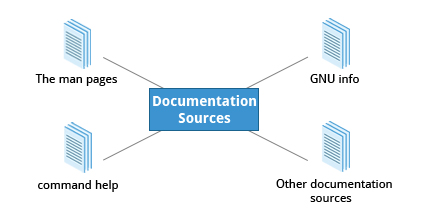
- The man pages (short for manual pages)
- GNU Info
- The help command and --help option
- Other Documentation Sources, e.g. https://www.gentoo.org/doc/en/
Which of the following are sources of Linux documentation?
The man pages
https://www.gentoo.org/doc/en/
=
The man pages
像是一本書
電子書是跨平台,pdf沒辦法跨平台
The man pages structure were first introduced in the early UNIX versions of the early 1970s. 1970s出來的
The man pages are often converted to:
- Web pages (html)
- Published books
- Graphical help (圖形)
- Other formats
man
cd 指的是變換目錄 資料夾
~這個帳號的目錄
..到上一層
/根目錄
......像是 cd ~
man –f generates the same result as typing whatis.
man –k generates the same result as typing apropos.
Manual Chapters
有 nine numbered chapters
如果選的是a
$ man 3 printf
$ man -a printf
$ man -a printf
$ man -a printf>>press h for help(q 跳出來)
What is displayed when running man with no options other than the topic as an argument?
The manual page for the given topic.
What does the man –k command display?
A list of the man pages discussing the subject.
What does the man –a command display?
All man pages in sequence with the given name in all chapters.
關機指令
http://blogger.gtwang.org/2013/10/how-to-shutdown-linux.html
halt 其實跟 shutdown 沒多大分別,只不過 shutdown 在關機時會把系統的服務都關閉之後,才關閉電腦,而 halt 指令則允許不管系統的狀態為何,直接停止電腦的運作
sudo poweroff -h
-r
shutdown --help
shutdown --help | more(更多)
sudo
網頁瀏覽器
qupzilla
=
GNU Info System
Command Line Info Browser
info <topic name>
info
Some useful keys are: q to quit, h for help, and Enter to select a menu item.
cal月曆
知道指令的用法or看文獻有三種方法
info poweroff
main poweroff
poweroff --help
su ~
info Page Structure
The topic which you view in the info page is called a node.
| Key | Function |
| n | Go to the next node |
| p | Go to the previous node |
| u | Move one node up in the index |
What does info <topic> show?
Shows the info page for the specified topic.
What does the info command (with no arguments) show?
Shows the index of topics. 索引
What are the topics in info pages called?
Nodes
2016年3月17日 星期四
2016/03/18
講義
http://lins.pbworks.com/w/file/106056036/LFS101x.2.pdf
專有名詞中英文都要背
第三章
Learning Objectives
partitions分割磁區檔案系統 filesystems啟動程序
Section 1: Linux Filesystem Basics
>Filesystems方法 架構
>Different Types of Filesystems Supported by Linux
ext234...
flash(usb)
Databas
Partitions and Filesystems
>是什麼?
A partition is a logical part of the disk, whereas a filesystem is a method of storing/finding files on a hard disk (usually in a partition).
>先partition(邏輯)到filesystems(組織)
Mounting Parameters掛在系統的參數(作業系統放在...)
>The Filesystem Hierarchy Standard
建立了標準Filesystem Hierarchy Standard, or FHS檔案系統組織的標準
>Linux uses the ‘/’:沒有磁碟機代號
>大小寫有分: /boot, /Boot, and /BOOT
>習題:
A possible correct full path for a "photo.jpg" file on a Linux system is /data/user1/images/photo.jpg.
//////////////////////////////////////////////////////////////////////////
Section 2: The Boot Process
>X Window System:xwindow 圖形界面系統
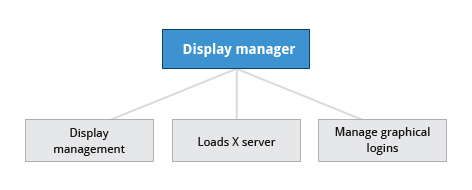
ctrl alt+F123456....七部電腦在跑
>The Boot Process程序
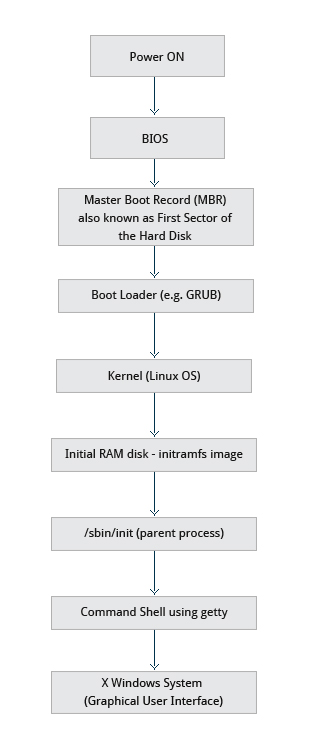
BIOS - The First Step
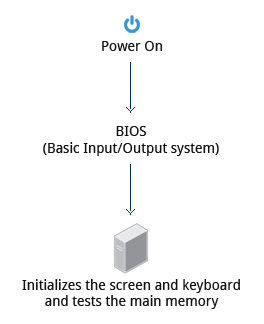
x86-based(cp)Basic Input/Output System (BIOS)*專有名詞要背
啟動硬體,所以又稱為 POST (Power On Self Test)
Master Boot Records (MBR) and Boot Loader
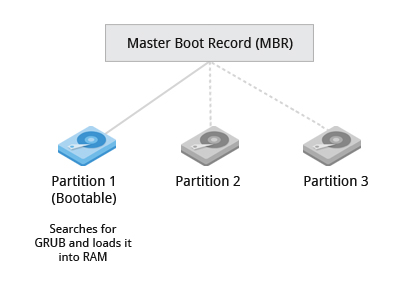
可擴展的Extensible Firmware Interface or EFI/UEFI systems
Boot Loader in Action
兩個步驟
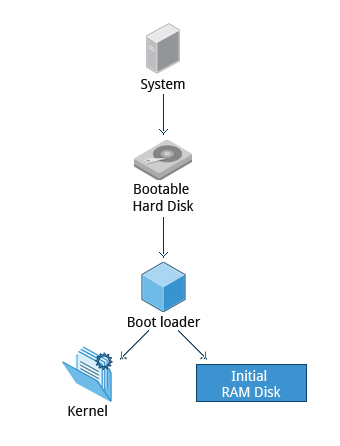
The Linux Kernel
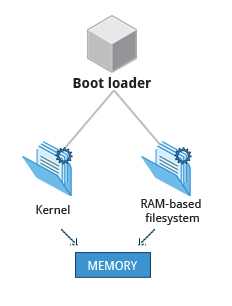
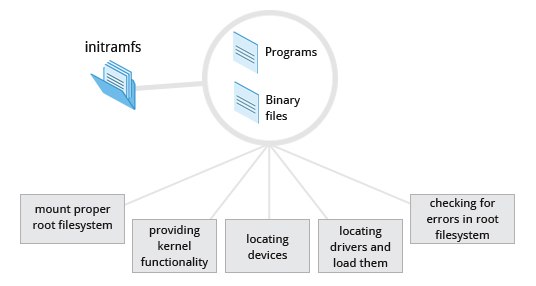
The Initial RAM Disk
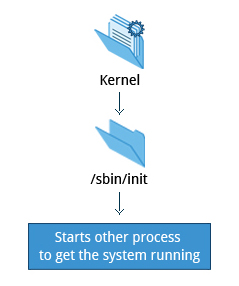
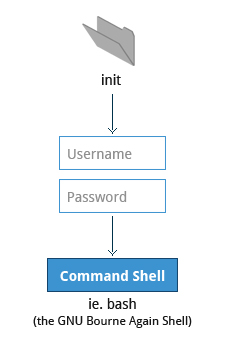 ubuntu的圖形界面叫做bash (the GNU Bourne Again Shell)
X Window System
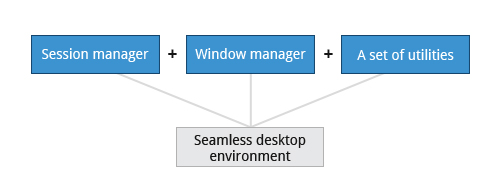
init
//////////////////////////////////////////////////
Section 3: Linux Distribution Installation
Choosing a Linux Distribution
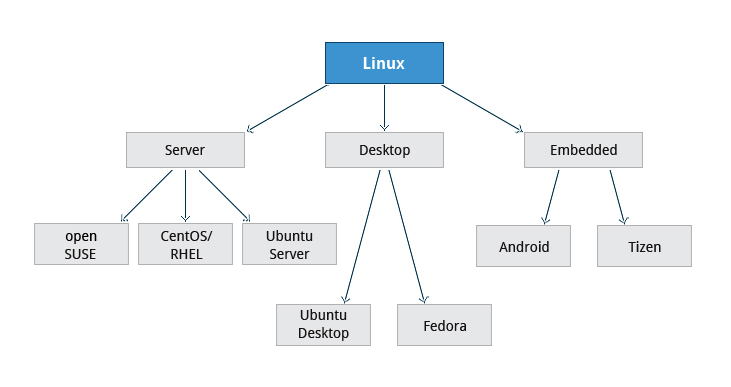
伺服器 桌面 embedded嵌入的來源
Questions to Ask When Choosing a Linux Distribution
安裝之前會問的問題
More About Planning in Linux Installation
要哪些軟體伺服器
安裝資料來源
Linux Installation: Install Source
Linux Installation: The Process
Linux Installation: The Warning
先備份在安裝
問題:
///////////////////////////////////////////////////////////////
Summary
ls
vi
http://lins.pbworks.com/w/file/106056036/LFS101x.2.pdf
專有名詞中英文都要背
第三章
Learning Objectives
partitions分割磁區檔案系統 filesystems啟動程序
Section 1: Linux Filesystem Basics
>Filesystems方法 架構
>Different Types of Filesystems Supported by Linux
ext234...
flash(usb)
Databas
Partitions and Filesystems
>是什麼?
A partition is a logical part of the disk, whereas a filesystem is a method of storing/finding files on a hard disk (usually in a partition).
>先partition(邏輯)到filesystems(組織)
Mounting Parameters掛在系統的參數(作業系統放在...)
>The Filesystem Hierarchy Standard
建立了標準Filesystem Hierarchy Standard, or FHS檔案系統組織的標準
>Linux uses the ‘/’:沒有磁碟機代號
>大小寫有分: /boot, /Boot, and /BOOT
>習題:
A possible correct full path for a "photo.jpg" file on a Linux system is /data/user1/images/photo.jpg.
//////////////////////////////////////////////////////////////////////////
Section 2: The Boot Process
>X Window System:xwindow 圖形界面系統
ctrl alt+F123456....七部電腦在跑
>The Boot Process程序
BIOS - The First Step
x86-based(cp)Basic Input/Output System (BIOS)*專有名詞要背
啟動硬體,所以又稱為 POST (Power On Self Test)
Master Boot Records (MBR) and Boot Loader
可擴展的Extensible Firmware Interface or EFI/UEFI systems
Once the POST is completed, the system control passes from the BIOS
to the boot loader. The boot loader is usually stored on one of the
hard disks in the system, either in the boot sector (for traditional BIOS/MBR systems) or the EFI partition (for more recent (Unified) Extensible Firmware Interface or EFI/UEFI
systems). Up to this stage, the machine does not access any mass
storage media. Thereafter, information on the date, time, and the most
important peripherals are loaded from the CMOS values (after
a technology used for the battery-powered memory store - which allows
the system to keep track of the date and time even when it is powered
off).
A number of boot loaders exist for Linux; the most common ones are GRUB (for GRand Unified Boot loader) and ISOLINUX
(for booting from removable media). Most Linux boot loaders can present
a user interface for choosing alternative options for booting Linux,
and even other operating systems that might be installed. When booting
Linux, the boot loader is responsible for loading the kernel image and
the initial RAM disk (which contains some critical files and device
drivers needed to start the system) into memory.
兩個步驟
The Linux Kernel
The Initial RAM Disk
/sbin/init and Services
Text-Mode Login文字界面
X Window System
More About the X Window System
問題:
Which one of the following component actually loads Linux?
Boot loader
_______ is responsible for starting system and network services at boot time.init
//////////////////////////////////////////////////
Section 3: Linux Distribution Installation
Choosing a Linux Distribution
伺服器 桌面 embedded嵌入的來源
Questions to Ask When Choosing a Linux Distribution
安裝之前會問的問題
- What is the main function of the system? (server or desktop)要哪種系統
- What types of packages are important to the organization? For example, web server, word processing, etc.哪些套件是一定會用到的
- How much hard disk space is available? For example, when installing Linux on an embedded device, there will be space limitations.硬碟容量(模仿成硬碟來作)
- How often are packages updated?多久要更新
- How long is the support cycle for each release? For example, LTS releases have long term support.多久一次release
- Do you need kernel customization from the vendor?kemel要不要客製化
- What hardware are you running the Linux distribution on? For example, X86, ARM, PPC, etc.
- Do you need long-term stability or short-term experimental software?要長期支援還是短期
More About Planning in Linux Installation
要哪些軟體伺服器
安裝資料來源
Linux Installation: Install Source
Linux Installation: The Process
Linux Installation: The Warning
先備份在安裝
問題:
///////////////////////////////////////////////////////////////
Summary
You have completed this chapter. Let’s summarize the key concepts covered:
- A partition(分割-磁碟分區) is a logical part of the disk.
- A filesystem is a method of storing/finding files on a hard disk.
- By dividing the hard disk into partitions, data can be grouped and separated as needed. When a failure or mistake occurs, only the data in the affected partition will be damaged, while the data on the other partitions will likely survive.
- The boot process has multiple steps, starting with BIOS, which triggers the boot loader to start up the Linux kernel. From there the initramfs filesystem is invoked, which triggers the init program to complete the startup process.
- Determining the appropriate distribution to deploy requires that you match your specific system needs to the capabilities of the different distributions.
ls
vi
2016年3月10日 星期四
2016/03/11
http://lins.pbworks.com/w/file/106056036/LFS101x.2.pdf
welcome and introduction
Three Important Pieces of Context
1. Things change in Linux---linux隨時都在變動
2. We've repeated some things in the class material---課程內有些東西是重複出現的
3. We've tried to avoid holy wars---選擇哪個都可
(simply because it has a bigger user base, not because we are taking a position as to which is superior.)
vi
CH1
Learning Objectives
- Understand the role of the Linux Foundation.了解 Linux Foundation的角色
- Appreciate the learning opportunities provided by the Linux Foundation's training program.了解訓練計畫
- Describe the software environment required for this course.了解軟體環境
- Describe the three major Linux distribution families.描述發行版
Section 1
S3
Focus on Three Major Linux Distribution Families
下面的是根據上面的發行版修改而來的
-------
打字
nano
gedit
終端機
echo myfile.txt
vi myfile.txt
訂閱:
文章 (Atom)